
Newsletter Signup
Stay up to date on all the latest news from Boston.com
If you’ve ever wondered how you got your rating on Uber, you no longer have to be in the dark.
You can now see a breakdown of your Uber ratings in the app and online, which will show you how many of each star rating you’ve received.
1. In the app, click on your picture in the top left.

2. Scroll down and hit “settings.”

3. Scroll down and hit “privacy.”

4. Hit “Privacy Center.”

5. Scroll to the left under “Your data and privacy at Uber” and hit “see summary.”

6. Scroll down to “Ratings” and hit “View my ratings.”

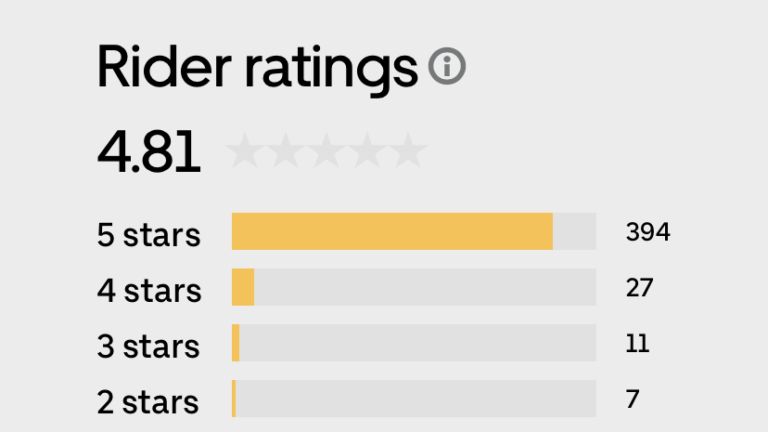
Your app should look something like this.

As you can see, I have a 4.81 rating, which is the average of 394 five-star ratings, 27 four-star ratings, 11 three-star ratings, seven two-star ratings, and *gasps* four one-star ratings.
Uber says that your rating is the average of your last 500 rides, and the app confirmed that I have taken 536 Uber trips total. Additionally, Uber gives you the option to download your data.
Unfortunately, the app doesn’t let you see any comments from drivers who rated you, so there’s no way to know for sure what you may be consistently doing wrong.
Still, Uber shared some tips for improving your ratings as suggested by drivers:
According to Boston Business Journal, Uber also shared the top 10 cities with the worst-rated passengers. It might not come as a surprise to hear that Boston was a part of the list, but at least we aren’t rated as badly as New York.
Here’s the list:
Stay up to date on all the latest news from Boston.com




To comment, please create a screen name in your profile
To comment, please verify your email address
Conversation
This discussion has ended. Please join elsewhere on Boston.com